AI agent playbooks
Coordinate webhook secret rotation
The agent prepares and checks the secret change, while a person performs the rotation on the web.
Goal
You coordinate a signing secret change without losing events or putting secrets in the conversation. The agent prepares and checks; an authorized person performs the rotation on the web.
Permissions needed
webhooks.readto read webhooks and delivery history within the granted scope.webhooks.manageto send tests.- Permission to operate the external receiver service, if you are assigned to check it.
integrations.manage expands webhook scope but does not remove human-only restrictions.
The secret rotation operation is marked humanOnly: true. It is not in PUBLIC_OPS, so there is no public MCP tool or public REST operation page for the agent to use.
Ask the person before
Ask which webhook needs rotation, who will update the receiver, the transition period and where the new secret will be stored.
If you suspect the secret has leaked, ask the person to decide whether to pause the webhook while addressing it. Do not extend acceptance of the old key yourself just to avoid errors.
Check first
Call whoami. Read webhooks.get and webhooks.deliveries_list through tools_run.
Confirm the destination URL and webhook owner. Check whether the receiver can accept the old and new secrets at the same time. Do not ask the person to paste a secret into a message for you to check.
Steps
- Record delivery health before the change.
- Agree on how to update the receiver's secret store.
- Prepare a receiver deployment that can verify multiple valid keys.
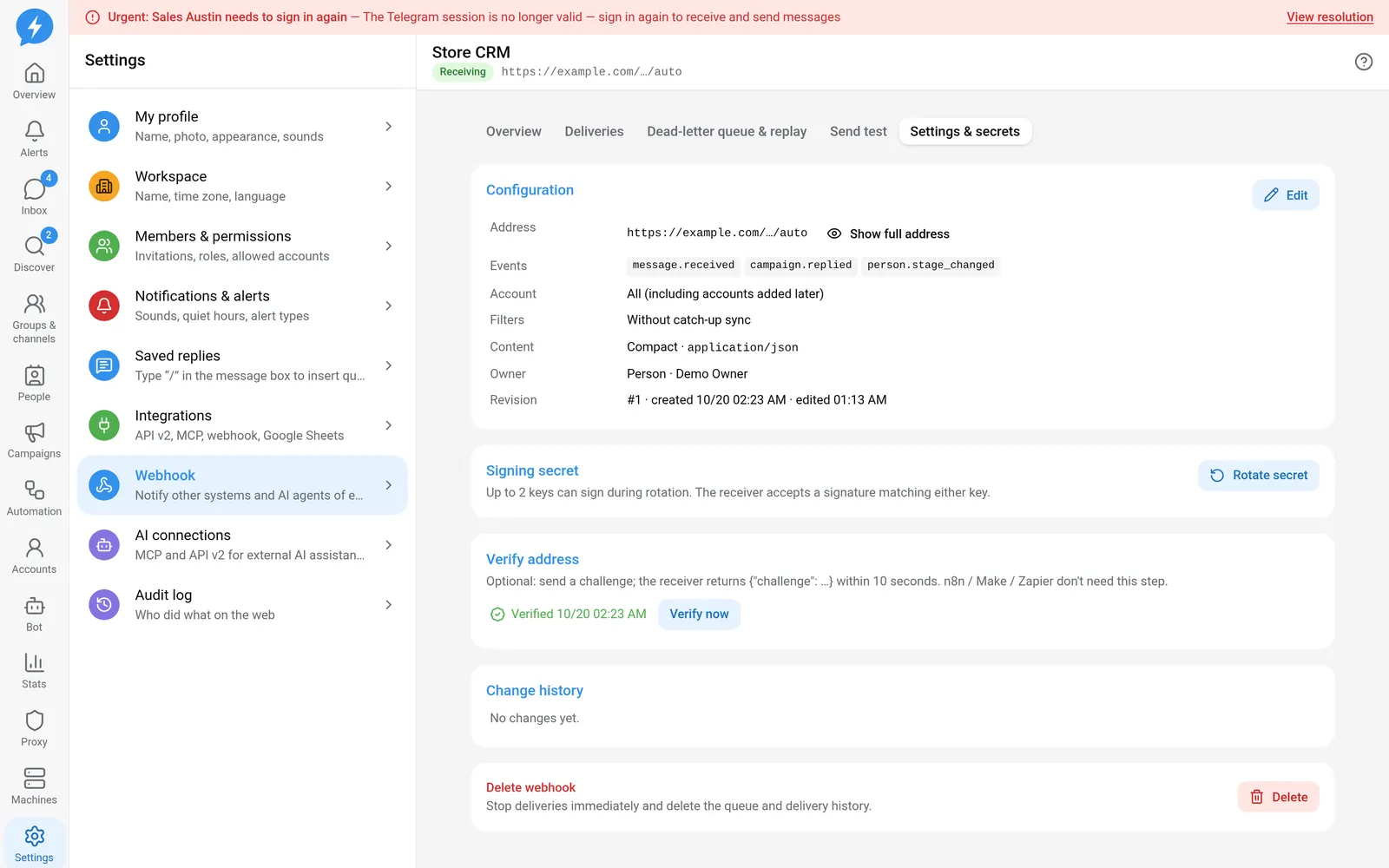
- Ask the person to open Settings → Webhook and select the webhook.
- Ask the person to open Settings & secrets.
- Ask the person to choose Rotate secret.
- Ask the person to save the new secret directly in the receiver's secret store.
- After the receiver has been updated, call
webhooks.test, usingwebhooks_testif available ortools_run. - Read the test delivery and check the receiver's verification result.
The default transition period is 24 hours. The system allows at most 2 active keys to sign at once. The receiver accepts a signature matching one valid key.
Check after
Check that new events are received successfully, not just events signed with the old key. Monitor deliveries after the change and check deduplication.
When the old key expires, confirm that the receiver still works with the new key. The report should contain only the webhook ID, results and times, not secret values.
On errors
If signatures do not match, check the secret source, raw body and machine clock. Do not disable signature verification as a temporary recovery measure.
If the new secret has been lost, refer the person to the web interface. The agent has no public API path to read the secret again.
When to stop
Stop when a human-only action is needed, you lack permission to update the receiver, or you have not proved that the receiver accepts the new key.
See signature verification and keeping secrets.