Guides
Read campaign results and progress
Compare the funnel, individual steps, and reasons for each campaign recipient.
Read campaign results from the overview down to individual recipients to see what is finished and what is still waiting. The sent-message count alone does not tell you whether a campaign has produced customers.
Who can do this
Owner and Manager. Opening conversations from results still depends on account access in Inbox.
Before you start
You need an existing campaign. If nothing has been sent yet, result sections may be empty — this is not an error.
Where to start
Open Campaigns, then select the campaign you want to review.
Steps
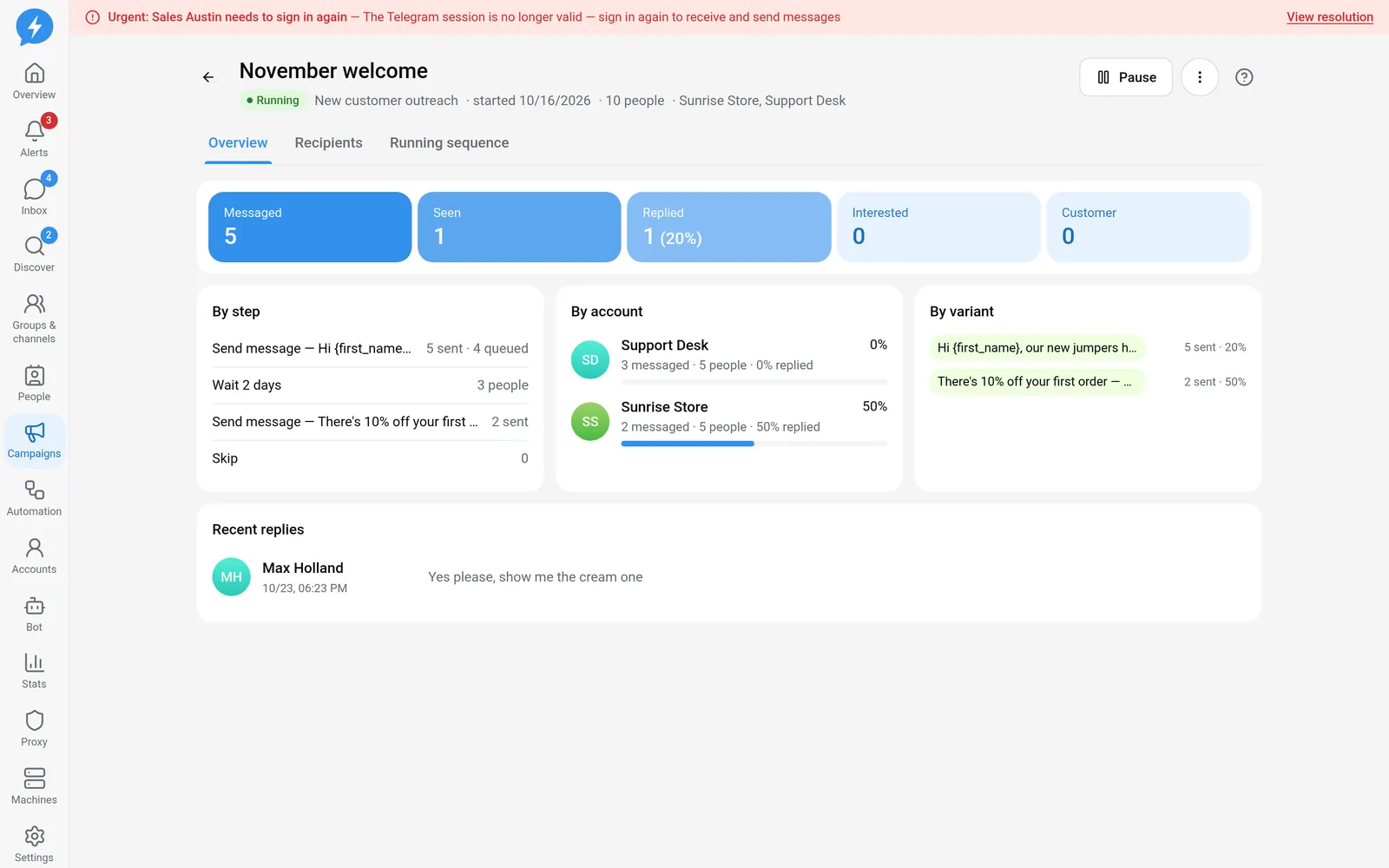
Read the funnel. Its milestones are Messaged, Seen, Replied, Interested, and Customer.
Milestone Question to answer Messaged Has Telegram accepted the sent message? Seen Has the recipient read it? Replied Has the person responded? Interested Has the person been moved to the interested stage? Customer Is the person in the customer stage? The last two milestones depend on stages set by people or your rules, not on the app guessing from message content.
Open By step. Compare sent counts with the number of people at each step. People remaining at a wait step is expected behavior, not a sending error.
Read By account. An account sending fewer messages does not necessarily mean it is broken — open the recipients list to find the reason.
Read By variant. Compare sends and replies across content versions. A variant with no sends has no data to compare yet.
View Recent replies, then use Open chat to enter Inbox. The preview does not replace the full conversation.
Open the recipients list. Filter by All, Running, Replied, Done, Skip, or Stopped.
Read each person's details. Check the sending account, message count, current step, and next run time. A person whose message is being sent does not yet have a confirmed send.
Read the reason before intervening. For held, skipped, or stopped recipients, the reason tells you whether to fix the account, audience, or content.
Review the running sequence. When a campaign has a new version, people who have already started still follow their own version; the draft being edited does not describe their sequence.
Result
You know who needs follow-up, which steps are waiting, and why progress is slow.
Check
Select someone in the list, open their profile or chat, and compare the history. If totals differ from what you see, check filters first.
If something goes wrong
Do not manually send a duplicate just because a recipient is waiting or the result is unclear. See Investigate a failed job and Unverified sends.
Do it with the API or MCP
Use campaigns.get and campaigns.people — MCP campaigns_get, campaigns_people.