Guides
Follow keyword signals
Configure keywords, read new signals in groups, and save relevant people to People.
Follow new messages matching keywords in groups where following is enabled. Signals help you choose people to review; the app does not infer needs with AI or automatically send greetings from this screen.
Who can do this
Owner and Manager can edit keywords, enable group following, and change signal statuses. Other roles read data according to their permissions.
Before you start
- A Telegram account that has joined the group.
- Follow keywords enabled for the group using that account.
- The machine running the account is connected.
- Keywords relevant to the needs you want to find.
Keyword following in Discover is separate from the switch that adds groups to Inbox. See also Groups & channels.
Where to start
Open Discover → Signals.
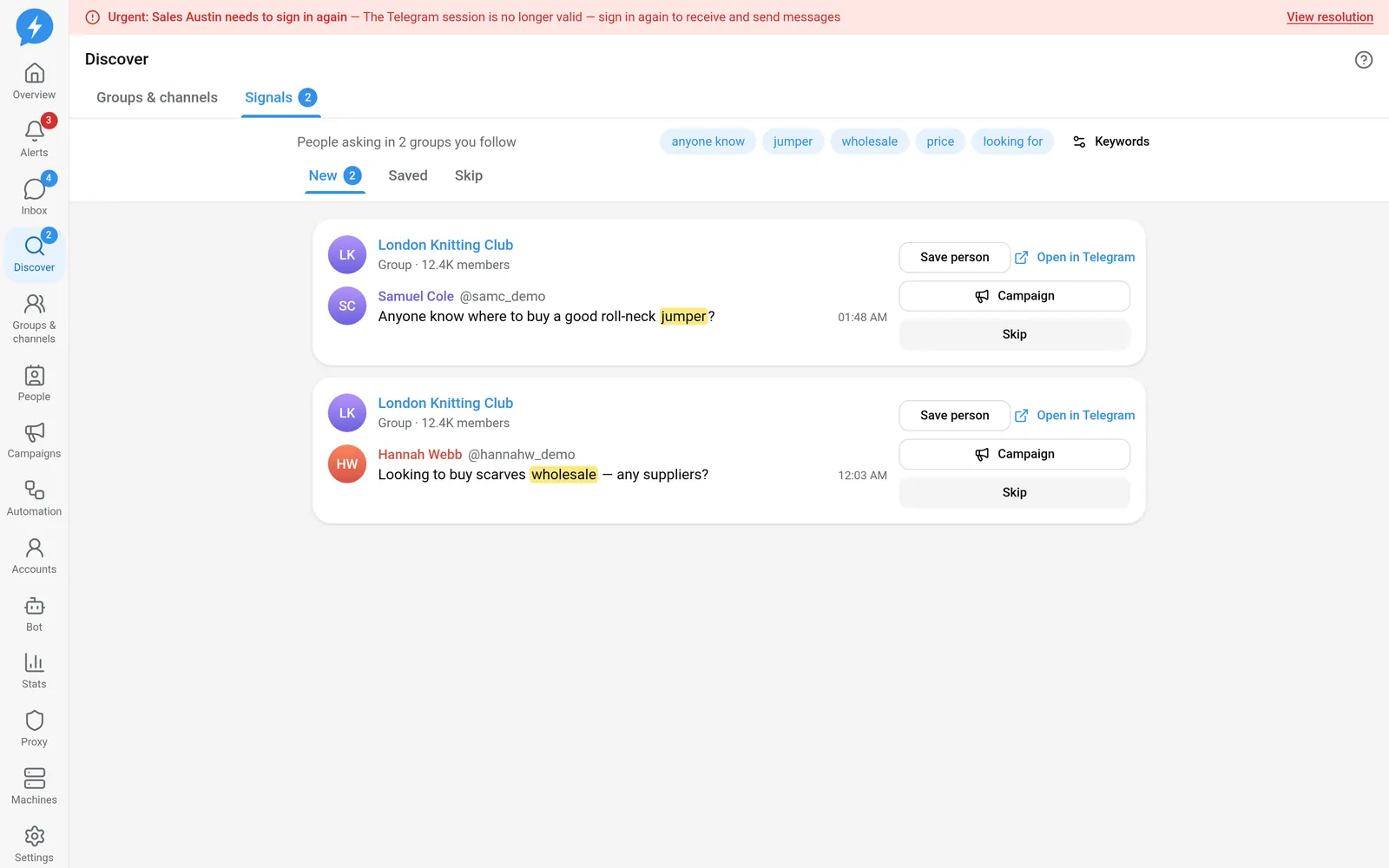
Steps
- Open Keywords.
- Enter words under Intent keywords, separated by commas.
- Enter words to exclude under Skip messages containing.
- Click Save.
- Open the group you want to follow from the group list.
- Enable Follow keywords using an account that has joined.
- Return to the Signals tab.
- Select New to read unclassified signals.
How you type keywords affects matching. Words without accents can match accented spellings; accented words match that specific spelling. Choose specific enough words and add exclusions if the list contains many irrelevant messages.
Signals are kept for 30 days. This is a feed of new messages collected while following, not a request to search the group's entire history.
- Select Open profile to view the sender.
- Select Open in Telegram if you need to read the message in its original context.
- Select Save this person to add a relevant person to your people-management workflow.
- Select Skip for signals that need no action.
| Status | Usage |
|---|---|
| New | Queue for you to read and classify |
| Saved | Signal saved for further handling |
| Skip | Signal you decided not to pursue |
Use Move to New to return a signal to the queue. Changing a signal's status does not send a message.
Result
You have a classified signal list and have saved relevant people. Further contact takes place from the profile or Inbox, subject to permissions and do-not-contact rules.
Check
Check the source group, sender, and matching content before saving. Do not assume every message containing a keyword is a purchase request.
If something goes wrong
If the list is empty, check that following is enabled, the account is still in the group, and the machine is online. Also check excluded words: an overly broad word can filter out messages you need.
If you need to open a conversation to reply, see Inbox; do not treat Open in Telegram as sending a message within the app.
Do it with the API or MCP
Use signals.list, signals.set_status, and discovery.save_settings.
Tool names: signals_list, signals_set_status, discovery_save_settings. Enable group following with groups.set_watch, tool groups_set_watch.