Guides
Read operational statistics
Filter by time and account to read customer support, discovery, campaign, and account health metrics.
Read metrics using the same time range and time zone to evaluate activity. Confirmed and unverified metrics are separate. Do not add them together as completed results.
Who can do this
Owner, Manager, Support, and Viewer can read statistics according to their data permissions. Owner and Manager can export CSV data.
Before you start
Check the workspace time zone before comparing days. Decide whether you need customer support, discovery/campaign, or account health metrics.
Where to start
Open Stats in the left menu.
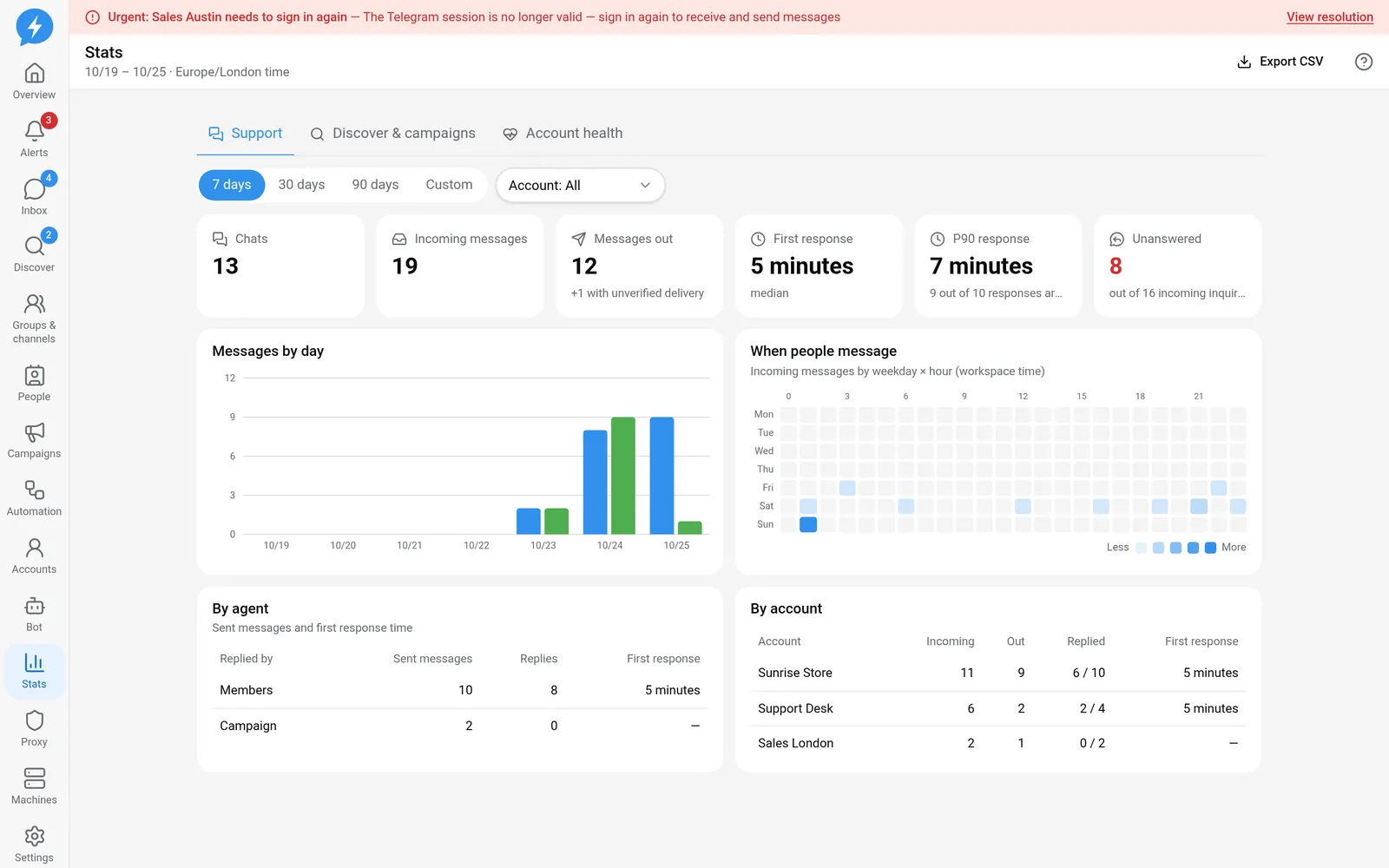
Steps
- Select a time range: Today, 7 days, 30 days, 90 days, or Custom.
- If you choose Custom, enter From date.
- Enter To date.
- Select the Account filter.
- Select the tab you want to read.
Dates and times use the workspace time zone. They do not automatically change with the interface language. Keep the same filters and time zone when comparing reports.
Support
This tab focuses on chats, incoming messages, sent messages, and replies.
| Metric | How to read it |
|---|---|
| First response | Time from the start of a person's incoming-message turn to the first reply in that turn |
| Median | The middle value among recorded response times |
| P90 response | A percentile showing that most responses are faster than the displayed value; not an average |
| Unanswered | Incoming-message turns with no recorded reply |
| Outgoing messages with unverified delivery | Messages not yet confirmed by Telegram, separate from confirmed sends |
An incoming-message turn is not the same as a single message. Consecutive messages sent before a reply should not be interpreted as multiple independent first responses.
You can read charts by day, incoming-message hour, staff member, and account. The staff filter narrows the Support view.
Discovery & campaigns
Track people found, Saved to People, people messaged in campaigns, and reply rates. The count of people messaged includes confirmed send results. Unverified results are shown separately.
Tables by source, group, campaign, and variant help trace results. The stage funnel shows existing people by stage. Do not treat every funnel value as the number of new people in the period.
Account health
Read health scores alongside slowdown, restriction, proxy, and stranger-message blocking events. A score does not guarantee that the account will avoid restrictions.
Uptime is the proportion of the measurement period during which the account stayed connected to Telegram. No connection history is different from zero uptime.
- Select Export CSV to download metrics for the current view.
Result
You have a report with a consistent filter context for comparison or internal sharing. CSV exports are also recorded in the audit log.
Check
Cross-check a few specific chats or campaigns. Check the unverified portion before concluding that sends are below expectations.
If something goes wrong
Empty charts may be caused by filters or a lack of activity during the period. Check the time range, account, and time zone before reporting missing data.
Do it with the API or MCP
Use stats.inbox, stats.gtm, and stats.health.
Tool names: stats_inbox, stats_gtm, stats_health. The API returns statistical data. The web CSV export button is not a separate public export action.