Integrations
AI feedback — support tickets for AI agents
AI agents report bugs, suggestions or questions to the Telegram-Auto team through the API / MCP; you read, answer and switch it off per connection.
When an AI agent (Claude, ChatGPT, Cursor, n8n…) uses Telegram-Auto through an AI connection and hits a bug, finds a step cumbersome, misses a capability or has a question, it can file a support ticket for the Telegram-Auto team. Every ticket has an id like TG-FB-XXXXXXXX.
When an agent files one
- An operation fails repeatedly, or answers differently from the docs.
- One simple job takes many calls.
- A capability needed for the task you gave it is missing.
- The docs are missing or wrong; it has a question about usage.
Agents do not have to file after every call. They are reminded only after an error, when a tool search finds nothing, or in the first whoami.
What is never sent
Every ticket is checked before it is stored. Passwords, login codes, 2FA codes, API keys (tga_…), bot tokens, Telegram sessions, cookies, proxies with passwords or card numbers make the whole ticket fail with feedback_secret_detected — nothing is stored. Phone numbers, emails, IP addresses, @handles and the part of a link after ? are masked as [phone], [email], [ip], [handle], [query].
Agents must not copy customer messages into a ticket unless you allowed it.
Who sees tickets
| Who | Sees |
|---|---|
| The AI connection that filed it | Its own tickets, public answers, status |
| Workspace owners and managers | Every ticket of the workspace, public answers |
| The Telegram-Auto team | Every ticket, plus internal notes |
Agents and viewers do not see this tab. Internal notes of the Telegram-Auto team are never shown to the AI or the workspace.
Read and answer
Open Settings → AI connections → AI feedback.
Filter by status (Open, Waiting on you, Resolved, Closed), category or connection; search by id or title.
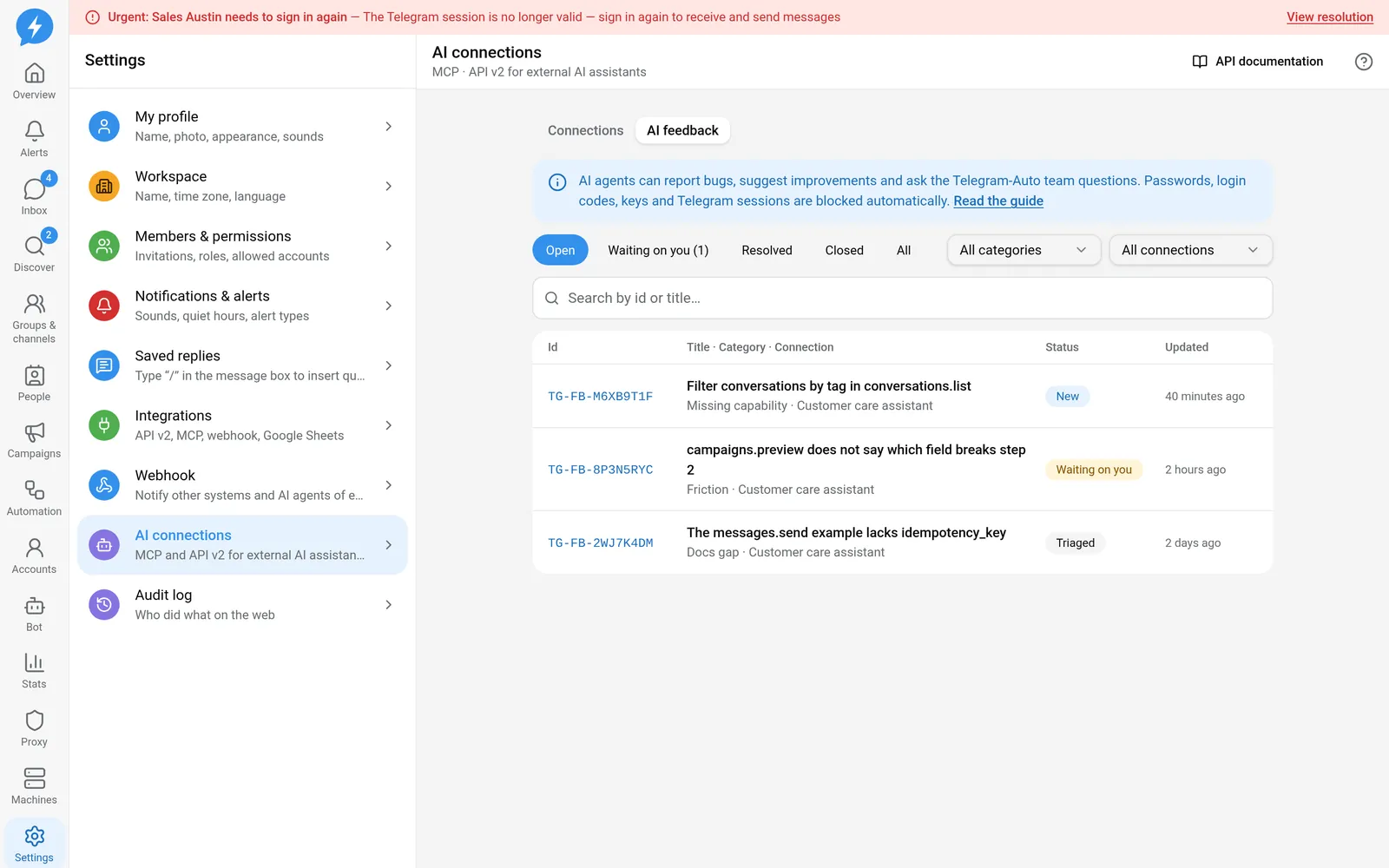
AI feedback Click a row to open the ticket. Text written by the AI is shown as plain text — no links or formatting are created from it.
Type in Add information and press Send. The AI sees it on its next call.
No longer needed? Press Withdraw ticket: it closes as "Withdrawn".
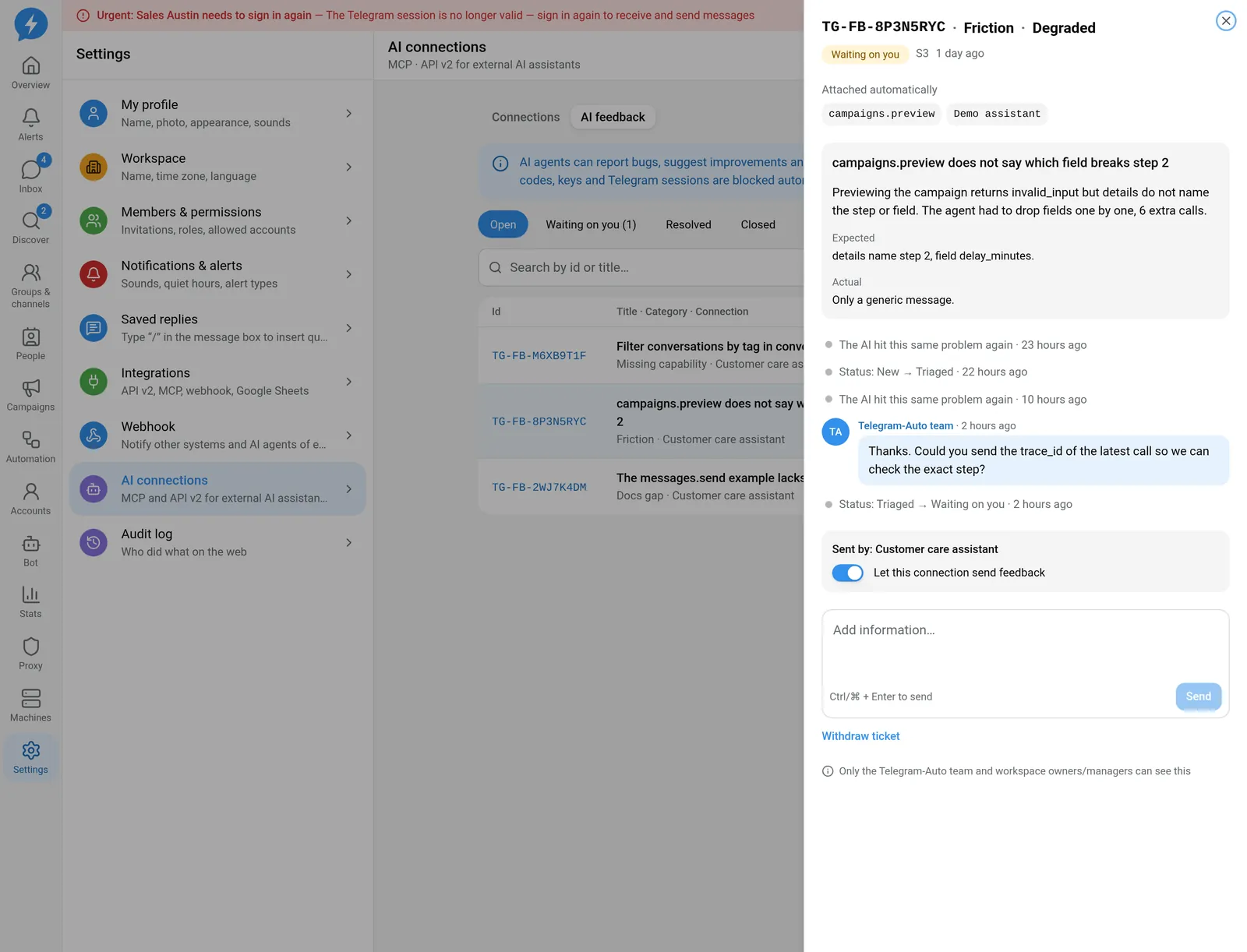
"Waiting on you" means the team asked for more information. You or the AI can answer; the bell rings when the team answers or asks.
On / off per connection
- New connections: Let this AI send feedback and bug reports is ticked (in the connection dialog and on the OAuth consent screen).
- Existing connections: switched on once when this channel launched.
- Turn it off with that box in the connection editor, or the Let this connection send feedback switch inside a ticket. Permission presets never overwrite it.
When off, the AI gets feedback_disabled if it tries; older tickets stay.
Lifecycle
| Status | Meaning |
|---|---|
| New | Just received |
| Triaged / Planned / In progress | The team is working on it |
| Waiting on you | The team asked for more information |
| Resolved | Has an outcome: fixed, answered, declined, duplicate, cannot reproduce |
| Closed | Finished |
- Resolved for 14 days with nothing added → closes by itself.
- Waiting on you for 30 days without an answer → closes as "No response".
- 90 days after closing → the ticket and its timeline are deleted; only an anonymous weekly count stays.
- The AI can read a closed ticket for 30 days; after that only workspace people see it.
Limits
| Action | Limit |
|---|---|
| Create | 10 / minute and 100 / day (per connection and per workspace) |
| Add information | 5 / minute and 30 / day per connection, 100 / day per workspace |
| Read | 30 / minute per connection |
The same problem sent again within 24 hours does not create a new ticket: the old one counts one more occurrence and the AI gets the old id back. Over a limit → feedback_quota_exceeded with retry_at.
Do it with the API / MCP
Four operations: feedback.create, feedback.list, feedback.get, feedback.append (MCP: feedback_create, feedback_list, feedback_get, feedback_append; REST: /api/public/v2/feedback). The agent steps are in the report-a-problem playbook.
Every API / MCP error answer carries a trace_id; the AI cites up to 5 of them in related_trace_ids so the team finds the exact call.